Borrowers: the people and entities you lend to
Borrowers (sidebar → Records → Borrowers) is your book of relationships. Every deal ties to a borrower, and the record accumulates what you need before the next loan: contact details, a risk rating with the reasons behind it, and a lending track record.
The borrower list
Section titled “The borrower list”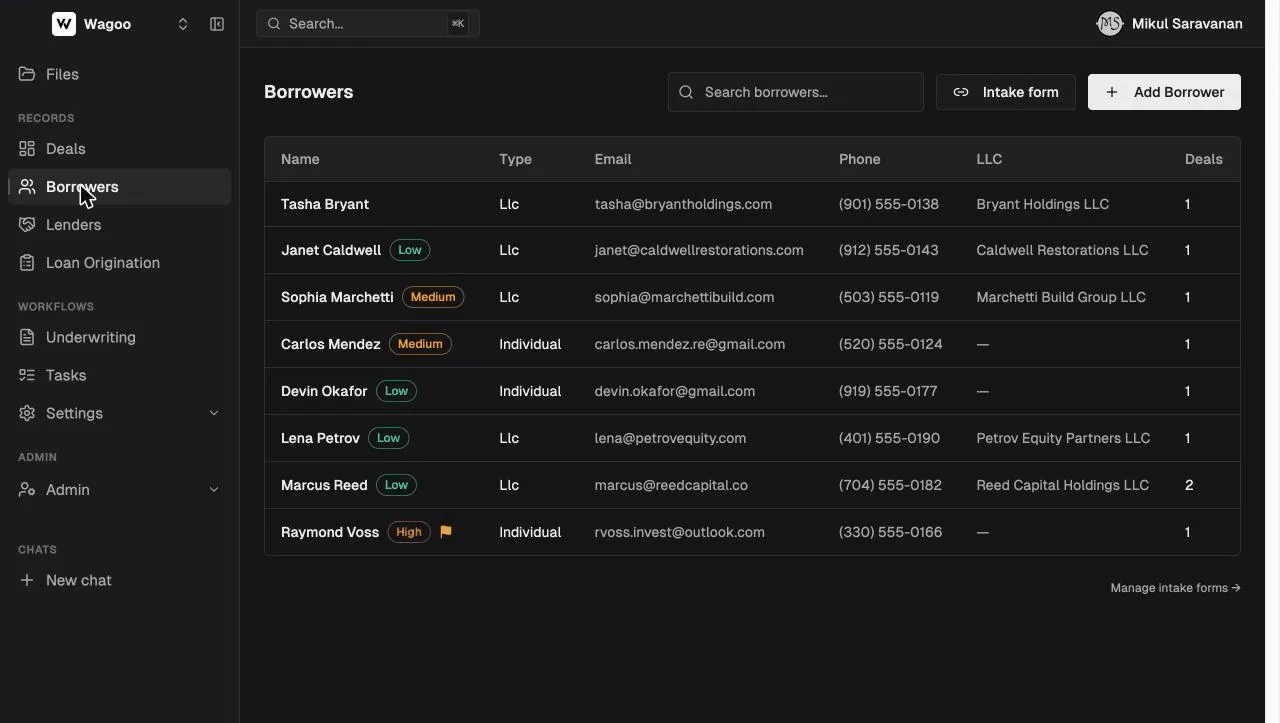
The table (search placeholder “Search borrowers…”) has these columns:
| Column | Notes |
|---|---|
| Name | With the risk pill and an orange follow-up flag; hovering the rating pill shows a tooltip with the rating meaning, deal count, and up to four live alerts (overdue interest / insurance) |
| Type | Individual or LLC |
| Email / Phone | Two separate columns |
| LLC | The entity name for LLC borrowers |
| Deals | How many deals they’re the primary borrower on |
Search matches first name, last name, email, and LLC name. The list is sorted by last name (no column sort or pagination); archived borrowers are hidden. Empty states: “No borrowers yet.” / “No borrowers match your search.”
From here you can:
- “Add Borrower” — an inline New Borrower card: Individual/LLC toggle, First Name* + Last Name* (validation “First and last name are required”), Email, Phone, and (LLC) LLC Name. Click “Create Borrower” (→ “Creating…”, toast “Borrower created”). LLC Address and License Address are edit-only, not on the create form.
- “Intake form” (header button, tooltip “Generate a shareable link that a borrower can fill out”) — opens the intake-form create dialog directly.
- “Manage intake forms →” (footer) — goes to the intake forms list.
Click any row to open the borrower.
The borrower record
Section titled “The borrower record”
Borrower Details
Section titled “Borrower Details”Type, name, email (a mailto: link), phone (a tel: link), LLC Name / LLC Address / License Address, rating, follow-up (shows “Follow-up: Yes”), and free-text Remarks. Click the pencil to open a separate Edit Borrower card, where you can also convert the type (Individual ↔ LLC), set the Risk Rating (Low / Medium / High, each with a tooltip, plus Clear), toggle “Flag for follow-up”, and write remarks (placeholder “Notes about this borrower (visible to your team)…”).
Performance Summary
Section titled “Performance Summary”Computed from the borrower’s primary deals:
- Total Deals · Completed (paid off or sold/refinanced) · Avg. Days (to payoff, ”—” when none) · Late (paid after final due date) / Default (current default/delinquent count)
- Active Loans (current) and Most Recent Payoff
Two lists: “Deals (n)” where the borrower is the primary party, and — when applicable — “Also involved in (n)” for deals where they appear as a co-borrower, guarantor, or entity, each tagged with the role (Borrowing Entity / Primary Borrower / Co-Borrower / Guarantor). Empty state: “No deals for this borrower.”
Custom Fields
Section titled “Custom Fields”Fields your admin defined, resolved by type: individuals see borrower fields, LLCs see borrowing-entity fields. Hidden in demo and when no fields are defined.
Risk ratings and follow-up flags
Section titled “Risk ratings and follow-up flags”| Rating | Color | Meaning |
|---|---|---|
| Low Risk | Green | Preferred — lend again |
| Medium Risk | Yellow | Case-by-case |
| High Risk | Red | Avoid — never again |
Set it in the Edit card (with a Clear option), and pair it with Remarks explaining why. The rating pill follows the borrower everywhere — the list, every deal header, and the parties section of any deal they touch — so their history is visible before you commit to the next loan. “Flag for follow-up” adds an orange flag, a lightweight “needs attention” marker independent of the rating.
Multi-entity borrowing: roles on a deal
Section titled “Multi-entity borrowing: roles on a deal”A deal’s Borrowing Structure section supports these party roles: Borrowing Entity, Primary Borrower, Co-Borrower, Guarantor. When adding a party you pick from Borrowing Entity, Borrower, or Guarantor — the Primary designation is derived (with a star to reassign it), not a fourth pickable role. Parties are contact/account records; a party that maps to a legacy borrower record links through to it. The primary borrower is what shows on dashboards and lists.
Archiving a borrower
Section titled “Archiving a borrower”The trash icon archives the borrower after confirming (“Archive this borrower? This will hide the borrower from your list. Their deals will remain.”). Nothing is deleted — deals, payments, and history stay. (There’s no un-archive control in the UI today.)
Frequently asked questions
Section titled “Frequently asked questions”Individual or LLC — which type should I pick? Pick what you’re underwriting. If the loan is to an entity with a person behind it, make the borrower an LLC (person as the contact), or model it fully with a Borrowing Entity + Guarantor structure on the deal.
Can a borrower be on multiple deals? Yes — the Deals count tracks primary deals; “Also involved in” catches every other role.
Who sees the risk rating and remarks? Everyone in your workspace. They’re internal — borrowers never see them.
Can I merge duplicate borrowers? Not automatically. Point the deals at the record you’re keeping (via each deal’s Borrowing Structure), then archive the duplicate.
Related: Deals · Intake forms · Reference: risk ratings