Reference
Quick lookups for navigation, statuses, and terms used throughout Wagoo.
Navigation
Section titled “Navigation”Every screen shares the same left sidebar. It’s grouped into sections, and items you don’t have access to are simply hidden.
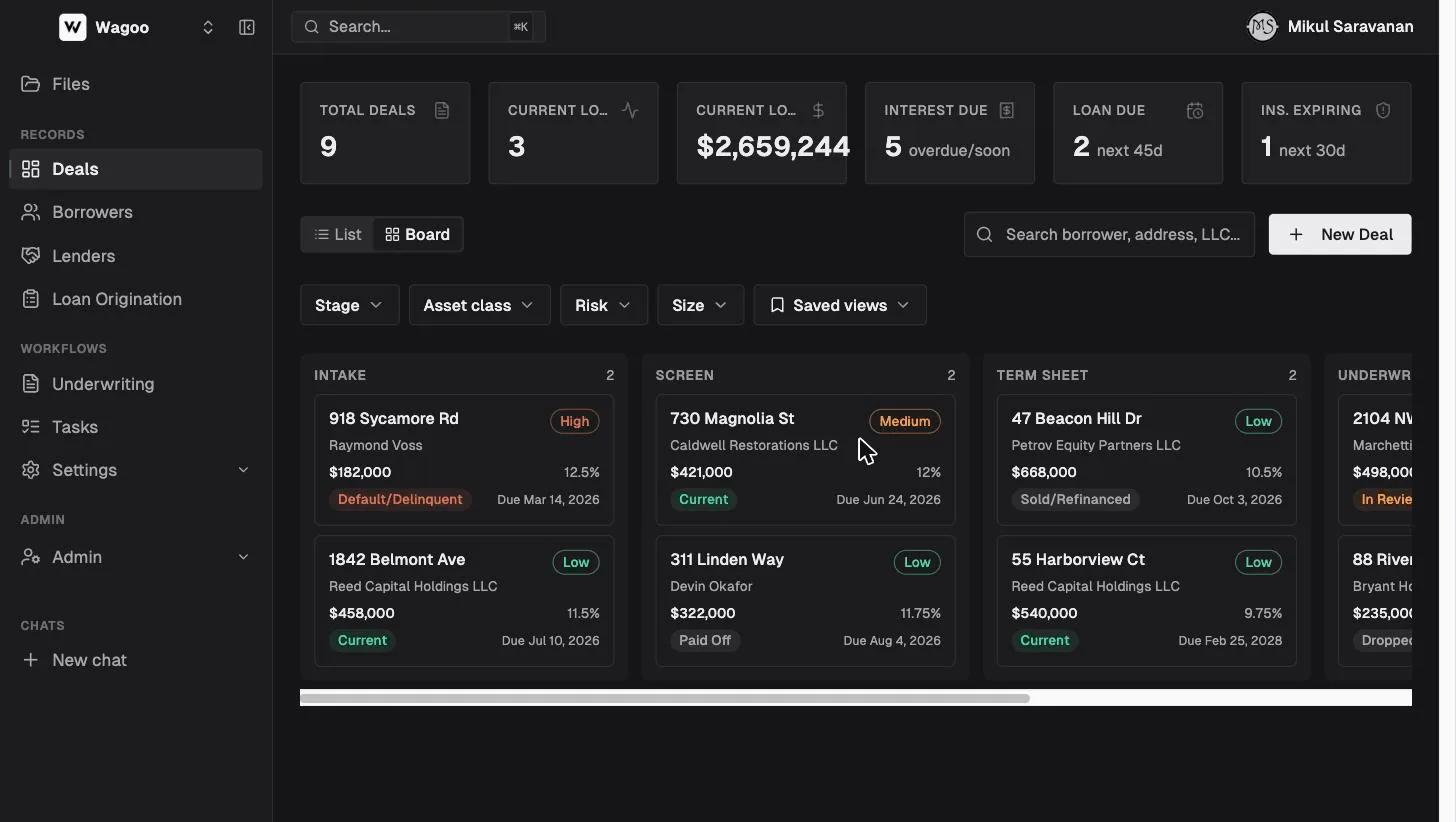
| Section | Item | What it opens |
|---|---|---|
| (top) | Files | Your shared file library, across all deals |
| Records | Deals | The Loan CRM dashboard (funded/servicing loans) |
| Borrowers | People and entities you lend to | |
| Lenders | Your lender list + the Wagoo directory of 6,000+ | |
| Loan Origination | The application pipeline (pre-funding) | |
| Workflows | Underwriting | AI credit-memo tool |
| Tasks | To-dos across your team | |
| Settings | Integrations | Connect Google / Microsoft |
| Custom Fields (admins) | Define your own fields per record type | |
| Pipeline Stages (admins) | Rename the deal board columns | |
| Admin (admins) | Members, Prompts, Analytics | Team and workspace management |
| Chats (bottom) | New chat + recent | The AI Assistant |
At the very top the workspace switcher lets you move between workspaces if you belong to more than one. The panel icon next to it collapses the sidebar to icons only.
The top bar has a global Search (also opens with ⌘K / Ctrl-K) and your account menu, where you set the theme (Light / Dark / System) and sign out.
Deal statuses (Loan CRM)
Section titled “Deal statuses (Loan CRM)”A deal always has exactly one status. You set it with the row of buttons at the top of a deal.
| Status | Meaning | Counts as… |
|---|---|---|
| In Review | Being evaluated, not yet funded/active | Active |
| Current | Funded and performing | Active |
| Default/Delinquent | Active but behind — still needs servicing alerts | Active |
| Paid Off | Loan repaid | Closed |
| Sold/Refinanced | Exited via sale or refi | Closed |
| Dropped Off | Fell through | Closed |
Closed statuses (Paid Off, Sold/Refinanced, Dropped Off) stop the servicing alerts — no more insurance-expiry, maturity, or interest reminders. Default/Delinquent is not closed: it’s an active loan that still needs attention, so its alerts keep firing.
Application statuses (Loan Origination)
Section titled “Application statuses (Loan Origination)”| Status | Meaning |
|---|---|
| Active | Applicant is still working on it |
| Submitted | Applicant has submitted for review |
| In Review | Your team is reviewing |
| Promoted | Converted to a CRM deal or underwriting deal (frozen, read-only) |
| Withdrawn | Applicant or you stopped it |
| Archived | Closed out |
Default pipeline columns are New → Docs Requested → Docs In Review → Conditions → Approved (admins can rename these).
Underwriting deal statuses
Section titled “Underwriting deal statuses”| Status | Meaning |
|---|---|
| Draft | Created, not yet analyzed |
| Processing | AI analysis running |
| Review | Analysis done, awaiting your decision |
| Approved | Accepted (shown as “Approved”; internally “completed”) |
| Rejected | Declined |
| Failed | Analysis errored |
Risk ratings
Section titled “Risk ratings”Borrowers and deals carry a three-level rating shown as a colored pill:
- Low Risk (green) — preferred
- Medium Risk (yellow) — case-by-case
- High Risk (red) — avoid / never again
Borrowers can also be flagged for follow-up (a flag icon next to their name).
Glossary
Section titled “Glossary”- Credit box — the set of rules that describe what a lender will fund: geography, asset classes, loan size, max LTV/LTC/ARV, rate and points range, term, minimum FICO, and whether they fund rehab.
- Allocation — how a deal’s loan amount is split across lenders, expressed as a percent or a dollar amount.
- Draw — a scheduled release of renovation funds against the loan’s renovation budget.
- Order-out — a third-party item ordered during origination (appraisal, title, insurance).
- Promote — converting a loan application into a CRM deal or an underwriting deal. This is permanent; the application becomes a read-only snapshot.
- Intake form vs loan application — an intake form is a lightweight, one-time link that collects borrower contact details and creates a borrower. A loan application is a full, resumable applicant portal that collects documents and runs through the origination pipeline.